Outcome-first discovery
Clarify the business problem, users, constraints and success measures before choosing a product.
MICROSOFT BUSINESS APPLICATIONS
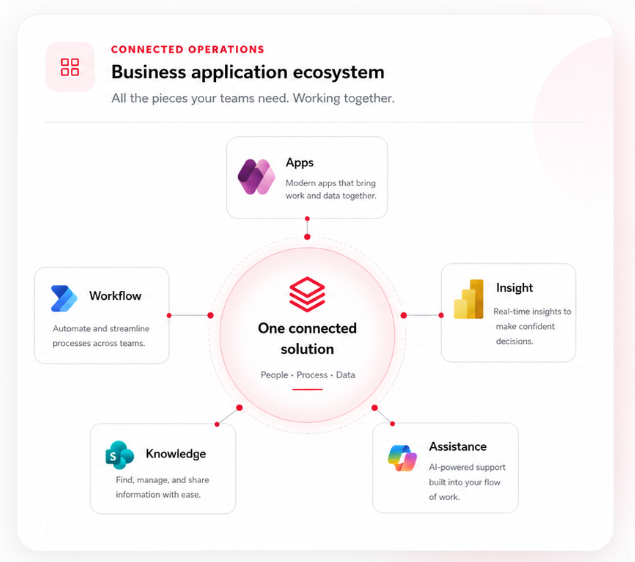
We design Power Platform, SharePoint, Copilot Studio and reporting solutions around the work your teams need to complete—not around product features.
WHY REDCHILI NETWORK
Technology is only useful when it improves the way people work. We start with the process, define the outcome and then select the right Microsoft components.
Clarify the business problem, users, constraints and success measures before choosing a product.
Combine Power Platform, SharePoint, Copilot Studio and reporting only where each component adds value.
Prepare trusted content, permissions and actions so AI can be introduced responsibly when it is useful.
Plan environments, ownership, security, support and lifecycle management as part of delivery.
Release in manageable stages, test with real users and use evidence to shape the next increment.
Monitor adoption, maintain the solution and prioritise improvements after launch.
FROM FRICTION TO FLOW
Clients buy simpler work, better control and clearer decisions. The platform is the means, not the outcome.
CONNECTED MICROSOFT SOLUTIONS
Start with one capability or combine services into a governed end-to-end solution.

Architecture, governance and delivery across the wider platform.
Explore Power Platform 02
Canvas and model-driven applications designed around real users and processes.
Explore Power Apps 03
Secure customer, supplier, partner and member self-service experiences.
Explore Power Pages 04
Approvals, notifications, integrations and document workflows.
Explore Power Automate 05
Governed AI agents connected to trusted knowledge and actions.
Explore Copilot Studio 06
Intranets, document management, migration, knowledge and SPFx development.
Explore SharePoint 07
Dashboards, semantic models and governed operational insight.
Explore Power BI & FabricBUSINESS CHALLENGES
Move requests through controlled stages with clear ownership and auditability.
Organise trusted information so teams can find, use and govern it.
Provide secure self-service without exposing internal systems.
Give teams one view of work, decisions, documents and next actions.
Turn process data into governed dashboards and actionable insight.
Help people find answers and complete tasks using approved knowledge and actions.
INDUSTRY CONTEXT
Sector context changes permissions, language, risk, workflows and adoption. Our industry pages show how the same Microsoft ecosystem can support different operating models.
Matters, documents and governed insight.
Explore LegalProjects, approvals and field operations.
Explore ConstructionSecure administration and service workflows.
Explore HealthcareClient delivery and knowledge reuse.
Explore ProfessionalOrders, inventory and customer operations.
Explore WholesaleMEASURABLE OUTCOMES
Every engagement should define the evidence that will show whether the solution is useful. Measures vary by process, but they often include time, quality, adoption and visibility.
View the case study frameworkTrack manual effort removed from repetitive tasks and hand-offs.
Measure how quickly requests move from submission to completion.
Monitor completeness, consistency and adherence to required steps.
Give decision-makers timely status, trends and exceptions.
WAYS TO START
Define the process, users, constraints, priorities and practical delivery options.
Explore the workshop 02Review an existing app, flow or SharePoint solution for risk and improvement opportunities.
Review the health check 03Maintain, monitor and improve business applications after deployment.
Explore supportDELIVERY APPROACH
Enough structure to manage risk, without turning delivery into a long technical exercise.
Map the current process, users, data, constraints and measures of success.
Choose the smallest coherent architecture and governance model that fits.
Build iteratively, integrate securely and test with representative users.
Support adoption, measure performance and prioritise the next improvement.
FREQUENTLY ASKED QUESTIONS
Cost depends on the process, user groups, data, integrations, security and support model. A focused discovery workshop is used to define scope and provide a clear delivery proposal.
SharePoint is often suitable for documents, collaboration and simpler list-based processes. Dataverse is usually stronger for structured relational data, complex security and application-led operations. The choice should follow the requirements.
Often, yes. We first assess what the spreadsheet is doing, who owns it and which parts should remain flexible before replacing it with an application or automated workflow.
Yes, when there is a clear task, approved knowledge, appropriate permissions and a way to evaluate the output. AI should be added where it improves the user journey, not simply because it is available.
Delivery time depends on scope and integration complexity. We prefer a usable first release with defined boundaries, followed by measured improvements rather than a long single release.
Yes. Support can include issue management, monitoring, enhancement planning, governance reviews and ongoing optimisation.
INSIGHTS & UPDATES
Current product updates and practical guidance, selected to match the services and decisions described on this page.
A practical Power Platform governance review covering environments, lifecycle management, adoption, capacity and operational health.
A practical review of the Power Apps 2026 release wave 1 changes that application owners, makers and support teams should assess.
A practical summary of Power Automate 2026 release wave 1 updates for cloud flows, desktop automation, licensing and operational support.
HAVE A QUESTION?